
Five minutes
instead of sixty
Set up a feed and talk through your analysis. sportsense tags the skills and summarizes your feedback automatically, so you never sort a clip manually again.
get your notes down, get your time back
The admin around video feedback is what stops most coaches from doing it consistently. Voice tagging removes every manual step, so the time you spend actually matches the value you deliver.
Voice tags automatically identify the rider and skill in each clip. No dragging files into folders or renaming anything.
Athletes join your feed with a QR code or link. Every clip posts directly to the feed, so there is nothing to transfer, upload, or send separately.
Speak your coaching notes while filming and sportsense transcribes them into a written summary. No typing, no copy-pasting between apps.
Voice-to-Tag
Stay organized and get video to your athletes in minutes, not hours.
If you have ever filmed a full session and then spent the next hour transferring files, sorting clips by rider, uploading them somewhere, and sending individual links hoping everyone finds the right one, you already know how much time that eats up. With sportsense, the workflow looks completely different.
- Create a feed for your session, camp, or team
- Share a QR code or link so your athletes can join in seconds
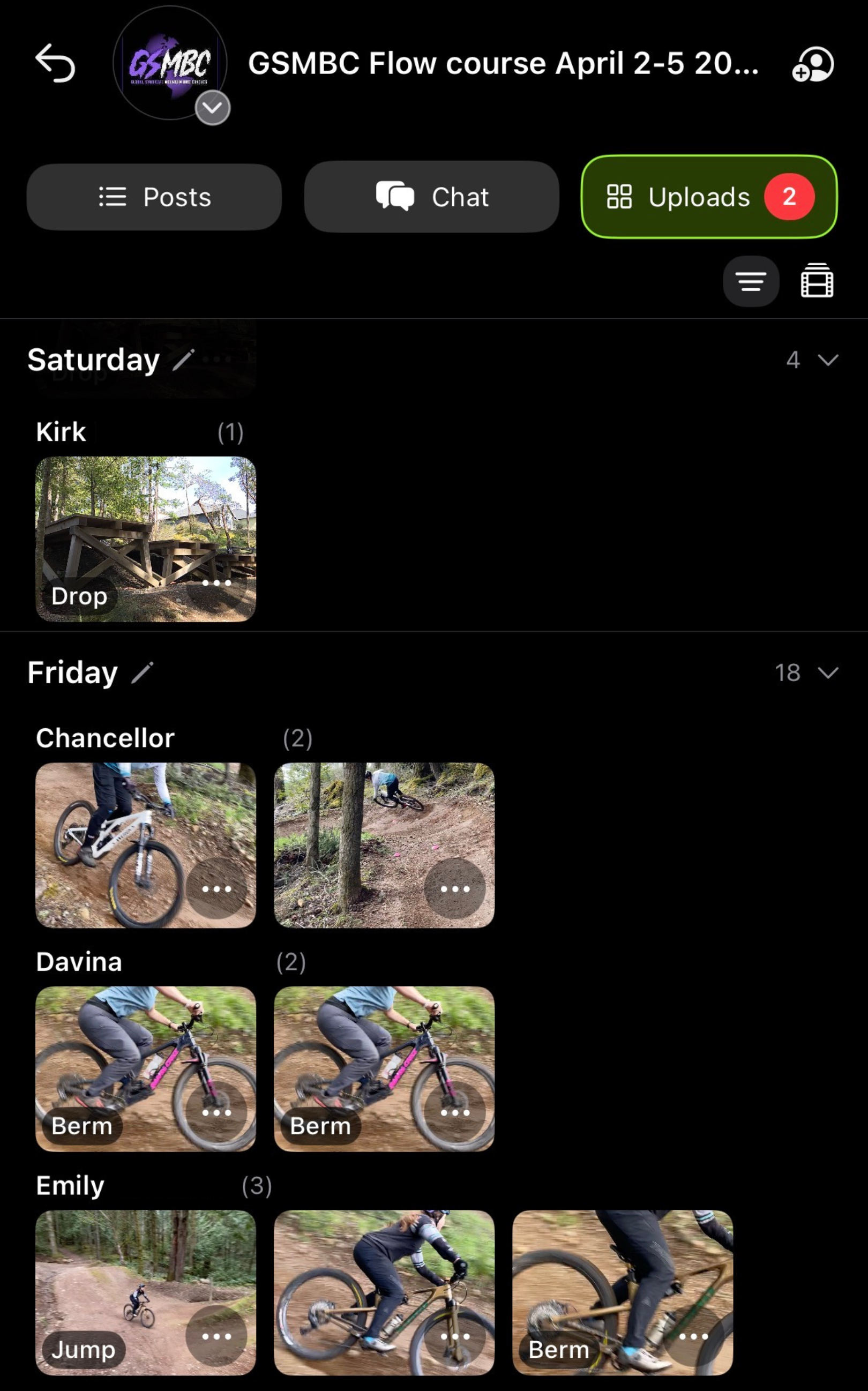
- Add video to the feed and voice-to-tag picks up the rider and skill automatically
- Media is organized automatically by day, rider, and skill, with no manual sorting required
Voice-to-Feedback
Speak while filming. The app handles the rest.
When you post a video to a feed, sportsense automatically transcribes your voice notes into a written summary, then tags the relevant skill and rider for you. You can edit both the tags and the summary before posting, but the heavy lifting is already done.
- Film and speak your coaching notes naturally while recording
- sportsense detects the audio, identifies the skill, and tags the rider
- Voice is transcribed into a clean, written summary attached to the clip
- Post to the feed with structured feedback attached, no typing or manual tagging needed

Use the filter icon in the top right of any feed to sort by rider or skill. This makes it easy to pull up every clip of a specific athlete across multiple sessions, or review all footage of a particular skill across your entire roster.
Video feedback works
Research in technical skill sports found that athletes who receive structured video feedback outperform those relying on verbal instruction alone. The gap is significant, and it compounds over time.
Faster improvement in athletes who receive video feedback versus verbal instruction alone
Greater gain in technical precision when structured video feedback is used consistently
Try it in your next session
Voice tagging, feeds, and the full coaching workflow are available on sportsense Pro. If you are on a free trial or on the Analyze plan, upgrading unlocks everything you need to start delivering structured video feedback consistently.
$25/month
sportsense.
Free to Start